
Family Space
Motorola Mobility LLC.Parenting
3.91.86K Reviews
- Version
- 3.1.55.8
- Installs
- 100.00M
- Age Rating
- Everyone
Screenshots

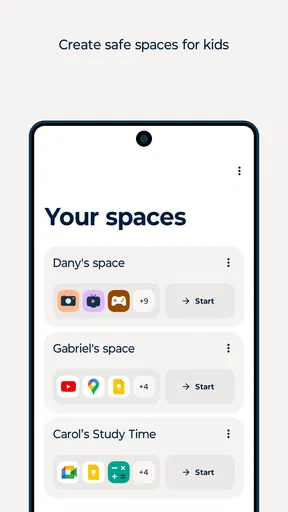
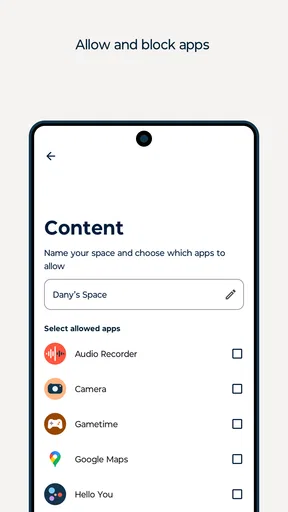
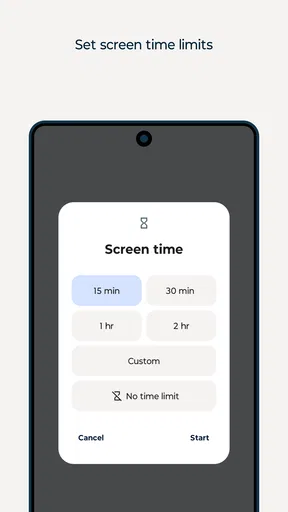
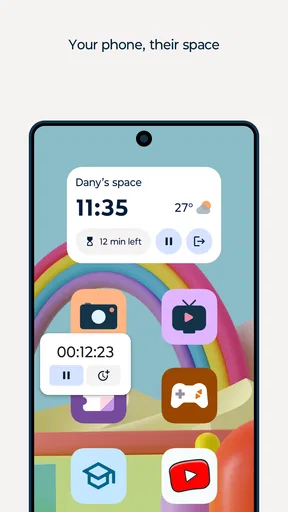
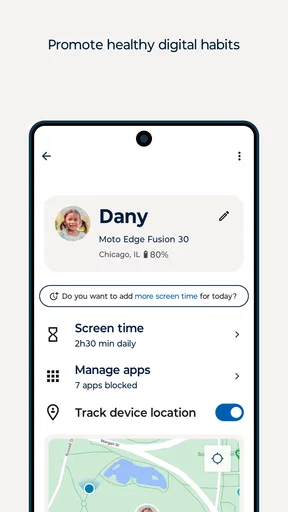
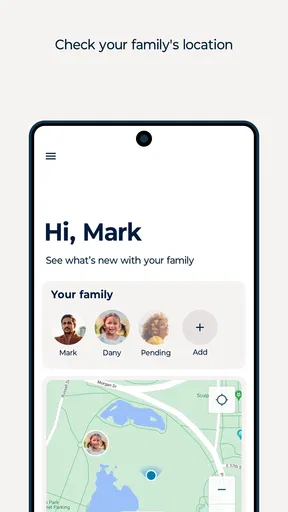
Our Review of Family Space
 Analysis by Appyee
I judge family apps less by how many tools they put on one screen and more by whether everyone in a household can use them without creating another source of tension. Family Space is Motorola Mobility LLC.’s free parenting app, and its appeal is the idea of putting shared plans and household coordination in one place. That can be useful, but family information is personal, so I would approach any shared hub with a little care rather than assuming that a friendly interface answers every privacy question.
Start with the household, not the feature list
The app is best suited to families who already want to coordinate together: parents managing school and appointments, relatives sharing plans, or a household trying to make responsibilities more visible. It is less compelling if everyone already follows the same calendar and has a messaging routine that works. In that situation, moving everything into another app may add a step rather than remove one.
A practical way to try it is to begin with one recurring need, such as keeping track of upcoming family events. If everyone finds that useful, you can consider adding tasks or using the communication tools. Starting small helps you see whether the shared routine fits your family before you ask everyone to change how they organize their day.
Trust depends on the choices you can actually see
When an app gathers family activity in one place, I pay attention to what the interface lets people manage and to the choices that are visible during setup and use. A privacy or sharing control is only useful if the family understands it and checks it when circumstances change. I would review the available settings with the people who will use the app, especially before adding details about children, appointments, or household routines.
I would not treat a general promise of privacy as a substitute for checking the controls in the app. The important habit is to share only what the group needs for coordination and to revisit who can see it when a child grows older, a caregiver’s role changes, or someone stops using the shared space. Those small decisions matter more than filling every available area with personal details.
When convenience meets sensitive information
A family calendar can reveal patterns even when each individual event seems ordinary: where someone goes, when they are usually away, or which appointments recur. Before putting those details in a shared calendar, I would ask whether every participant needs the full information or just a reminder that affects the group. A short event label can sometimes coordinate a pickup without exposing unnecessary context.
The same restraint applies to messages and photos. A family chat may feel private because it is intended for relatives, but it is still a digital place where details can be shared beyond the original moment. I would use it for everyday coordination and think twice before posting sensitive documents, a child’s personal information, or anything that would be uncomfortable if forwarded or viewed on a shared device.
A routine that gives people room to choose
Shared tools work best when they help people make decisions rather than quietly turning into a way to monitor one another. I would agree on what the calendar is for, who is expected to add events, and whether task reminders are gentle prompts or firm deadlines. That conversation can prevent a useful household aid from feeling like a scoreboard.
It also helps to make participation practical. A relative who only needs to know the time of a family gathering may not need to manage chores, while a parent coordinating pickups may need a more active role. Give each person a clear reason to use the app, and avoid putting information there simply because the option exists.
Motorola’s app has an average rating of 3.8 from around 22,000 ratings, alongside roughly 1,700 written reviews. It has reached over 100 million installs, is rated for everyone, and was released on January 11, 2023. Those figures suggest broad reach, but they do not tell me whether its controls suit a particular family; the useful test is whether the current settings and everyday workflow feel clear to the people involved.
It is free, and version 3.1.55.8 requires Android 12 or later. That makes compatibility an early practical check: if a family member’s Android device cannot run it, a shared calendar or messaging option already available to the household may be easier than asking that person to upgrade or switch devices. I would also avoid assuming that every family member needs the same level of access just because one person is setting things up.
For a household deciding between this and separate calendar, task, and chat apps, the trade-off is straightforward. A single family-oriented space can make coordination feel less scattered, while separate tools may offer a more familiar routine or suit people who do not want family conversations mixed with planning. I would choose the setup that people will actually check, not the one with the longest feature list.
Hey there, fellow app enthusiasts! Today, I'm diving into the world of Family Space, an app that promises to bring harmony and organization to our bustling family lives. I’ve been spending some quality time with this app, and I’m excited to share my thoughts with you. So, let’s jump right in!
What is Family Space All About?
First off, let me give you a quick rundown of what Family Space aims to do. It’s designed to be your go-to tool for managing family schedules, tasks, and communication. Think of it as a digital hub where everyone in the family can stay connected and organized. Whether you’re juggling school events, family outings, or chores, this app has got your back.
Simplicity Meets Functionality
One of the things I love about Family Space is its user-friendly interface. The design is clean and intuitive, making it super easy for anyone in the family, from tech-savvy teens to less tech-inclined grandparents, to navigate. The app’s layout is straightforward, ensuring that you spend less time figuring things out and more time actually getting things done.
Upon opening the app, you’re greeted with a dashboard that displays all the essential features at a glance. From there, you can easily access the calendar, task lists, and messaging features. It’s like having a family assistant right in your pocket.
Family Calendar: A Game Changer
The family calendar feature is a real game changer. It allows every family member to add events, appointments, and reminders. The best part? You can sync this calendar with other calendars you might be using, like Google Calendar or Apple Calendar. This integration ensures that you never miss an important date, whether it’s a doctor’s appointment or grandma’s birthday dinner.
Plus, the color-coded events make it a breeze to see what’s coming up for each family member. No more double-booking or last-minute surprises!
Task Lists That Actually Work
Let’s talk about the task management feature. We all know how difficult it can be to keep track of everyone’s chores and responsibilities. With Family Space, you can create task lists for each person and set due dates. It’s a great way to encourage accountability and ensure that everyone pitches in.
Assigning tasks is simple, and the app sends reminders to help keep everyone on track. Say goodbye to nagging and hello to a more harmonious household!
Communication Made Easy
Another feature worth mentioning is the in-app messaging system. It’s like having a dedicated chat room for your family. You can send quick messages, share photos, or even create group chats for different topics like vacation planning or weekend activities.
This feature helps keep all family-related communication in one place, eliminating the need to sift through endless text threads or emails. It’s efficient, and I found it to be a fantastic way for everyone to stay connected.
Keeping Things Secure
In today’s digital age, security is crucial, especially when it comes to family information. Family Space takes this seriously by offering robust privacy settings. You can control who sees what and ensure that sensitive information stays within the family circle.
The app’s developers have put a lot of thought into making sure your data is safe and sound, which gives me peace of mind as I manage our family’s affairs through the app.
Where the shared setup can snag
Even with a clear dashboard, a shared system needs someone to keep it tidy. If two people add the same appointment, or one person changes a plan without telling the rest of the group, the calendar can become less dependable. I would make one person responsible for checking important entries and encourage everyone else to flag changes in the family chat rather than assuming a calendar edit will be noticed.
Notifications also need a little thought. Reminders can help with a forgotten chore or a pickup, but too many alerts can train people to ignore them. I would reserve reminders for events where timing matters and use the task list for responsibilities that can wait. That simple distinction keeps the app from becoming another noisy source of interruptions.
A realistic test for a busy week
Imagine a parent arranging an after-school pickup while also trying to remember a medical appointment and a grocery errand. The family calendar can make the appointment visible, a task list can assign the errand, and a quick message can clarify who is collecting the child. The value is not that the app makes decisions for the family; it is that each person can check the same plan instead of relying on a chain of separate texts.
For that workflow to hold together, I would agree on a simple rule: the calendar is the source for times and dates, while messages are for questions or last-minute changes. Without that distinction, plans can end up scattered between a calendar entry and a chat thread. It is a small setup choice, but it makes a shared space much easier to trust.
Who will appreciate it—and who may not
Family Space makes the most sense when several people need to coordinate recurring schedules and are willing to check a shared space. Parents managing school events alongside appointments, or relatives helping with regular caregiving, may appreciate having plans and messages gathered together. The color coding can also help a busy household scan the week quickly instead of reading every event in detail.
I would skip it if your family is reluctant to install another app, if you depend on tools that do not fit into its workflow, or if the person who manages the household would rather keep a private calendar and send only the details others need. A shared app cannot fix unclear responsibilities on its own. In some families, a simple group message and an existing calendar are less work and create fewer expectations.
Questions worth settling before relying on it
One practical question is whether the app can fit around the calendars your family already uses. The stated ability to sync with Google Calendar or Apple Calendar can reduce duplicate entry, but I would test a low-stakes event first and check how edits appear on both sides. If a change is not obvious to everyone, keep critical appointments in the calendar each person already checks until the routine is reliable.
Another question is what to do when somebody leaves the household group or no longer needs access. I would look through the current sharing controls before adding people and again when roles change, rather than assuming an old arrangement will stay appropriate. The same check is sensible after setting up a child’s device or a shared tablet, where other people may be able to see what is open on screen.
If you are deciding whether to put a sensitive detail in the app, ask whether the rest of the family needs that exact information to act. Often a time, pickup location, or simple reminder is enough. This keeps the shared calendar useful without turning it into a detailed record of everyone’s movements.
Final Thoughts
So, would I recommend Family Space? Absolutely! It’s a well-rounded app that offers a suite of features designed to make family life smoother and more organized. From managing schedules to facilitating communication, it covers all the bases in a user-friendly manner.
Whether you’re a busy parent trying to juggle multiple schedules or someone looking to streamline family communication, Family Space is definitely worth checking out. Give it a try and see how it can transform your family’s day-to-day interactions. Happy organizing!
Verdict
Strengths of Family Space
- User-friendly interface suitable for all ages.
- Parental controls enhance child safety.
- Real-time location tracking for family.
- Easy setup and minimal configuration.
- Cross-platform compatibility for convenience.
Limitations of Family Space
- Battery consumption can be high.
- Requires internet for full functionality.
- Limited offline features available.
- Some premium features need a subscription.
- Occasional location inaccuracies reported.
Similar Picks in This Category
View All
شرطة الأطفال - مكالمة وهمية
Oub Apps4.1

Findmykids: Parental Control
LETEM LTD4.6

Pregnancy + | Tracker App
Philips Electronics UK Limited4.8

Policía de niños - para padres
Kids police4.7

Pregnancy App
Amila4.9

Pregnancy and Due Date Tracker
Wachanga4.5
Frequently Asked Questions
What is Family Space and how does it work?
Family Space is a comprehensive family management app designed to help families stay organized and connected. It offers features like shared calendars, to-do lists, and messaging, allowing family members to coordinate activities efficiently. The app also includes a location-sharing feature and parental controls to ensure safety and ease of communication.
Is Family Space available on both Android and iOS devices?
Yes, Family Space is available for download on both Android and iOS platforms. This ensures that all family members, regardless of their device preference, can access the app's features. Users can download the app from the Google Play Store for Android devices and the App Store for iOS devices.
What are the parental controls available in Family Space?
Family Space includes robust parental controls to help parents manage their children's app usage and screen time. Parents can set limits on app usage, monitor online activity, and receive alerts about their child's location. These features provide peace of mind and help in fostering a safe online environment for children.
Can Family Space integrate with other calendar apps?
Yes, Family Space can integrate with popular calendar apps like Google Calendar and Apple Calendar. This integration allows users to sync events and appointments seamlessly, ensuring that all family members are on the same page. It makes managing schedules more convenient and prevents any scheduling conflicts.
Is there a subscription fee for using Family Space?
Family Space offers both a free version and a premium subscription. The free version includes basic features, while the premium subscription unlocks advanced features like enhanced parental controls, additional storage, and priority customer support. Users can choose the plan that best fits their family's needs.
